
Merge Groups
The Merge Groups interface provides a centralized way to consolidate multiple data groups (Wells, Forecasts, and Type Wells) into a single, unified entity. This tool is essential for aggregating results from different scenarios or geographical areas for comparative analysis.
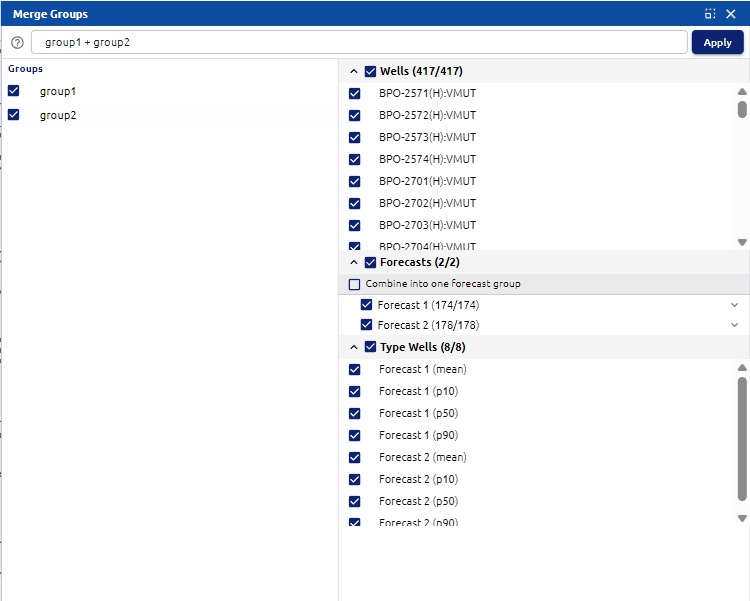 Merge Groups Menu
Key Features
1. Group Naming and Execution
- Group Name Input: Located at the top, this field allows you to define the name of the new consolidated group. It often defaults to a combination of the source group names (e.g.,
group1 + group2). - Apply Button: Once all selections are finalized, clicking Apply executes the merge and creates the new group in the project tree.
2. Source Selection (Left Panel)
- Groups List: This panel lists all available groups that can be merged. Checking the boxes next to group names (e.g.,
group1,group2) will load their respective contents into the main configuration area for detailed selection.
3. Configuration Categories (Main Panel)
The main panel allows for granular control over what specific data is carried over into the merged group:
- Wells: Displays a count of all wells within the selected source groups (e.g.,
417/417). Users can expand this list to include or exclude specific wells by checking or unchecking individual IDs. - Forecasts:
- Selection: Lists the individual forecast sets found in the source groups.
- Combine into one Forecast group: A toggle option that, when checked, flattens the selected forecasts into a single consolidated forecast set within the new group.
- Type Wells:
- Allows users to select specific statistical profiles associated with the forecasts (e.g., mean, P10, P50, and P90 iterations).