
Optimizer
If the plan configuration has been applied in optimizer mode, the Optimizer button will be visible and enabled in the main tool bar, which gives access to the following options:
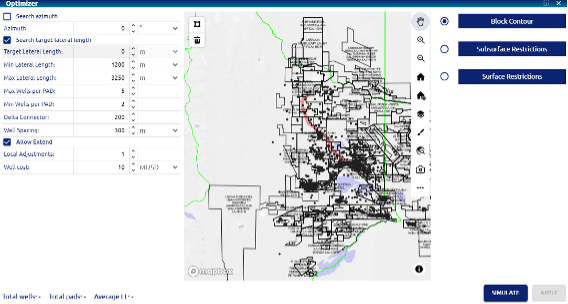 Filed development plan – Optimizer
Input parameters
• Search azimuth: check box that disables the option for the user to enter the desired azimuth angle, if this option is chosen, this value will be determined in the simulation.
• Azimuth: azimuth value to use in the simulation, expressed in degrees.
• Search target lateral length: check box that disables the option for the user to enter the desired target lateral length, if this option is chosen, this value will be determined in the simulation.
• Target Lateral Length: objective lateral length to be considered in the simulation.
• Min Lateral Length, and Max Lateral Length: Minimum and maximum limits to be considered in the simulation for lateral length.
• Max Wells per PAD, and Min Wells per PAD: maximum and minimum number of wells per pad to be considered in the simulation.
• Delta Connector: Connection between pad center and the beginning of lateral
• Well Spacing: is the distance or interval established between wells in the field configuration
• Allow Extend:
• Local Adjustments: adjustment factor in the regular distribution of wells, it can take values 0, 1, or 2 and different strategies will be executed to complete the distribution
• Well cost: estimated cost for drilling and completing a well Map interactions: Through the polygon tools available on the map, the contours for the development block and its restrictions (on the surface and in the subsurface) are determined.
• Simulate button: generates the simulation with the entered parameters
• Apply button: incorporates the results of the simulation carried out into the dev plan
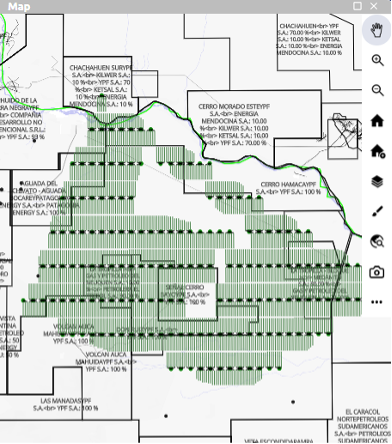 Filed development plan – Results for drilling configurations and restricted areas
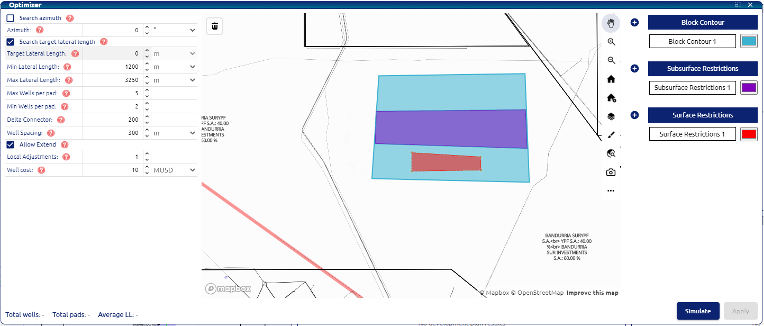
On the right side of the Optimizer window the user can create three types of contours:
1- Block Contour: this will be the main area of the field that the optimizer will use as boundaries to fit the wells
2- Subsurface restrictions: user can define restrictions for the subsurface where the algorithm will not be able to drill a well or go through with the effective horizontal section of the wells.
3- Surface restrictions: User can define restrictions for the surface. This will restrict where the well heads will be located.