
Field Development Plan
The Development Plan feature will be located over a new tab ‘Dev Plan’ in the navbar.
 Dev Plan main toolbar
Development plans
This view will showcase the list of available development plans for the user. It will enable him to create, load, and delete plans. Clicking the ‘eye’ button will reveal the settings for the selected plan.
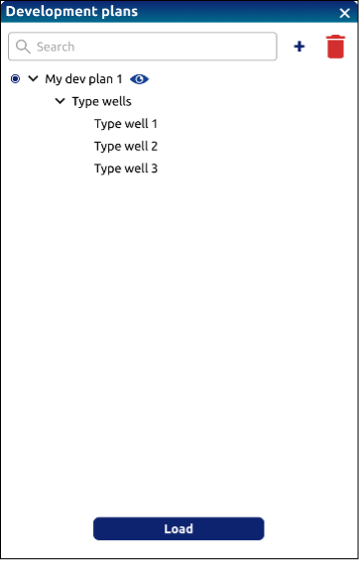 Create/Select development plan
Creating a new dev plan
By creating a new plan (via the ’+’ button), its configuration options are displayed, offering the possibility of using the ‘optimizer’ or the ‘manual’ mode.
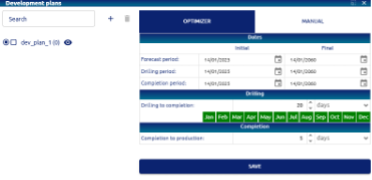 New development plan – Optimizer configuration
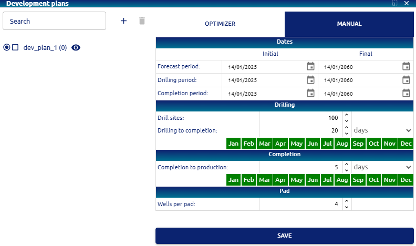 New development plan – Manual configuration
Input parameters
• Dates: the Initial and Final date must be set for the Forecast, Drilling and Completion periods.
• Drilling:
     o Drilling to completion: time required for drilling to completion, expressed in days.
     o (only for Manual configuration) Drill sites: number of drill sites
     o Drilling allowed months: the months in which drilling can be carried out must be selected.       Initially, the twelve months of the year appear enabled (in green), by clicking on each one       they can be changed to disabled (red).
• Completion:
     o Completion to production: time required for completion to production, expressed in days.
     o (only for Manual configuration) Completion allowed months: the months in which completion can        be carried out must be selected. Initially, the twelve months of the year appear enabled        (in green), by clicking on each one they can be changed to disabled (red).
• Save: the save button applies the set configuration to the selected dev plan.