
Convert to Bottomhole Pressure (BHP)
This feature will allow the user to calculate BHP starting from wellhead pressure (WHP). It’s located in the ‘Analysis’ tab, in the ‘Dynamic Data Analysis’ navbar section, the functionality will be enabled if selected wells have WHP data.
 Dynamic Data Analysis in the main toolbar
The wells to be included in the calculation must be selected from the group of working wells:
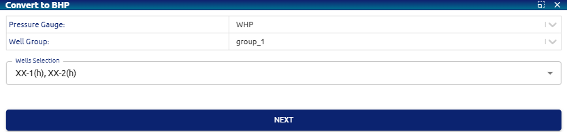 Convert to BHP – Wells selection
The calculation module consists of three tabs ordered according to the necessary process flow.
Well Configuration tab
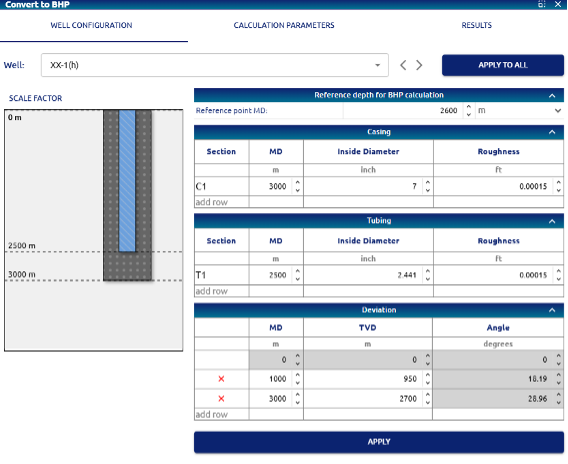 Convert to BHP – Well configuration tab
In this section, the well’s installations necessary to perform the pressure calculation from wellhead to bottom must be entered:
• Reference depth for BHP calculation: datum at which the bottom pressure calculation will be taken.
• Casing and Tubing tables: In both cases, the necessary sections are entered to describe the different pipe sections, with the objective of including changes in diameter and roughness.
• Deviations: The deviation of the well is entered by completing the different sections based on the values of MD (developed depth) and TVD (true vertical depth). With this information, the module calculates and displays the angle corresponding to each section.
To the left of this calculation section is a diagram of the well pipes reflecting the depths and diameters entered.
The APPLY and APPLY TO ALL buttons allow you to assign the entered data to the selected well, or to all those included for the calculation, respectively.
Calculation parameters tab
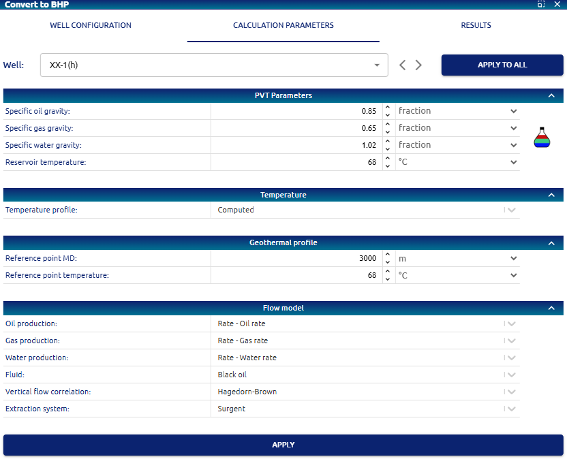 Convert to BHP – Calculation parameters tab
The parameters necessary to perform the calculation are entered/selected for the following items:
• PVT parameters: Based on the specific gravities of the gas, oil and water, and the reservoir temperature, the calculation module uses correlations for black oil to obtain the PVT parameters necessary in each stage of the calculation. If the selected wells already have a PVT assigned, these four values can be extracted from it with the PVT access button available.
• Temperature and Geothermal profile: The temperature gradient is calculated internally prior to performing the calculation using the Computed option, available and the reference depth and temperature.
• Flow model: The data source must be selected for the gas, oil and water flows, currently it is available to obtain it from the production history of the wells (Rate – Oil rate, Gas rate, and Water rate).
Fluid refers to the characterization of the type of well fluid, available options:
     o Black oil
     o Volatile oil
     o Condansate
     o Dry gas
Vertical flow correlation: used to determine the head loss in pipes, available options:
     o Oil fluids: Hagedorn-Brown, Fancher-Brown, Dukler-Eaton, Beggs-Brill, Beggs-Brill-NS,       Orkiszewski, Duns-Ros, Gray.
     o Gas/Gas_Condensed fluids: ENAP-FDC, GID-Gould, Aziz et al, Beggs-Brill, Beggs-Brill-NS,       Duns-Ros, Gray
Extraction system: available for surgent wells.
Results tab
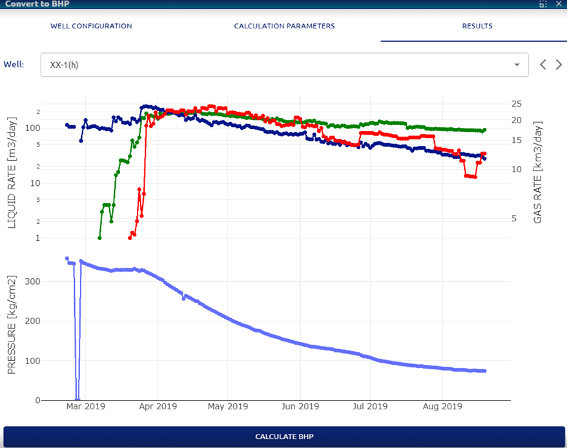 Convert to BHP – Results tab
Before starting the calculation, the well production history (gas, oil and water flows) and the wellhead pressure history are shown for each well selected for the calculation. Through the CALCULATE BHP button, the calculation process is started for all the wells included in the analysis.
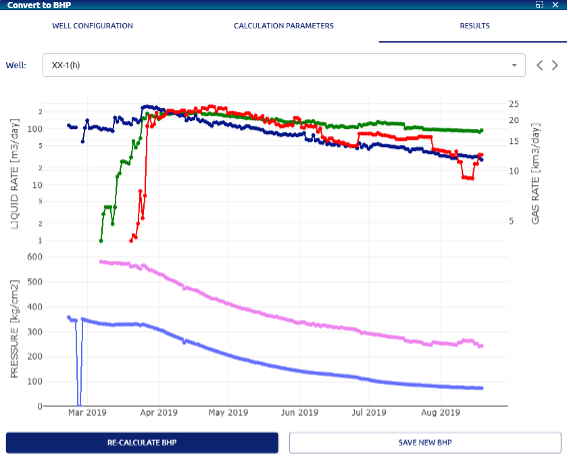 Convert to BHP – Results tab after calculate
For each well, the calculated bottomhole pressure curve (in pink) is shown on the same graph as the wellhead pressure. In this instance, the buttons to RE-CALCULATE BHP and SAVE NEW BHP are displayed, which will overwrite the previously calculated curve.